
Hello, I'm Son. QA Engineer from Healthcare. Today is the 10th day of freee QA Advent Calendar 2025.
I am grateful for this opportunity to write an article for this event and excited to share my experience about performance testing and its tool.
Self Introduction and Background
I have been a QA since 2022 in a start-up fintech company. I somehow planned to pursue this career before my graduation (my main career path was Software Engineer but it changed when I started this career, which I enjoyed what I'm currently doing). During my past experience as a QA, I had an opportunity to conduct performance testing. It's somehow difficult to understand at first, how it works, how to plan it, and how to apply it in the development and testing process.
When I was assigned to conduct performance testing, the first thing I did is to explore the tool, which is JMeter. An API tool primary used for performance testing. I deep dive the usage of the tool and research about the planning phases for conducting performance testing. It had a successful impact during my execution where I found significant problems from the services, such as rate limit issue, unusual data duplication process, and invalid data validation, which is helpful to replicate the weird behavior in the services. Since we're processing multiple transactions, we essentially were required to conduct performance testing to identify the risks from the services. That's all for my overall previous experience.
As of now, I'm planning to roll this out sooner for conducting the performance testing on a specific product or microservice. Moving forward to the main topic.
What is Performance Testing?
Performance Testing is a non-functional testing technique where it identifies the bottlenecks and determines the stability, speed, reliability, and responsiveness of services or products that holds up under a given workload.
The main goal of performance testing is to eliminate the bottlenecks that could impact user experience or system reliability. It also helps to understand the system's behavior under normal, peak, and stress conditions, and to prevent this problem in the development phase before it reach to the production environment.
Importance and Key Objective
We always ensure customer/user satisfaction with the applications or services and we don't want them to be disappointed. It is important to have the stability and reliability of the services, that's why we conduct performance testing to ensure the service is stable and can handle normal or peak conditions.
Here are the Key Objectives for Performance Testing:
Ensure Optimal Response Time: The main goal of the performance testing is to identify the response time of the applications to measure how steady and quickly the system responds to user requests or interactions. Services must have acceptable response time to provide a smooth user experience.
Validate System Throughput: Throughput determines the number of requests in a given time. It validates and verify the system's behavior whether it can handle the multiple requests or not, depending on the set time limit. This ensures the stability of the system when having a peak load enters the system process.
Verify Stability and Reliability: To verify the stability and reliability of a system, it requires to conduct endurance/soak testing, to measure the consistency of a system under sustained load for extended period. It also helps to verify memory leaks or system degradation over time.
Identify and Eliminate Bottlenecks: By analyzing performance test data, teams can pinpoint slow queries, inefficient code, or configuration issues that have an impact on the system's performance and quickly address this matter.
Ensure Consistent User Experience: Performance testing identifies early risk detection in a service before it reaches to the customers/users. This ensures user experience satisfaction, strengthening trust, and reliable service.
Types of Performance Testing
Performance testing is a critical, non-functional testing technique used to assess a system's speed, scalability, and stability under various load conditions. Here are the most common types of performance testing:
Load Testing: It measures the application/product performance under a specific number of users in a given period. This ensures the system can handle expected traffic while maintaining an optimal user experience.
Stress Testing: It evaluates the application/product performance under extreme load conditions. This helps to identify the breaking point of a system.
Soak/Endurance Testing: It determines the application/product performance over the extended period of time. This ensures the system can operate whether it receives a bottleneck, memory leaks, degradation, or still operate smoothly.
Scalability Testing: It determines how the application/product performance can adapt with the gradually increase of load over time. This helps to identify when to upgrade the server whenever the number of users might increase.
Tools for Performance Testing
There are multiple tools for conducting performance testing, but it requires subscription payment to access the essentials features from it. Currently, in my case, I'm using JMeter to conduct a performance testing. It is an open-source pure java software application dedicated for non-functional testing (e.g. load, spike, soak, stress testing) to measure the system's performance. It can be used to simulate a heavy load on a server, group of servers, network or object to test its strength or to analyze overall performance under different load types. To be able to run performance testing, you must have a basic knowledge of API testing since it requires to get the request method to simulate the process.

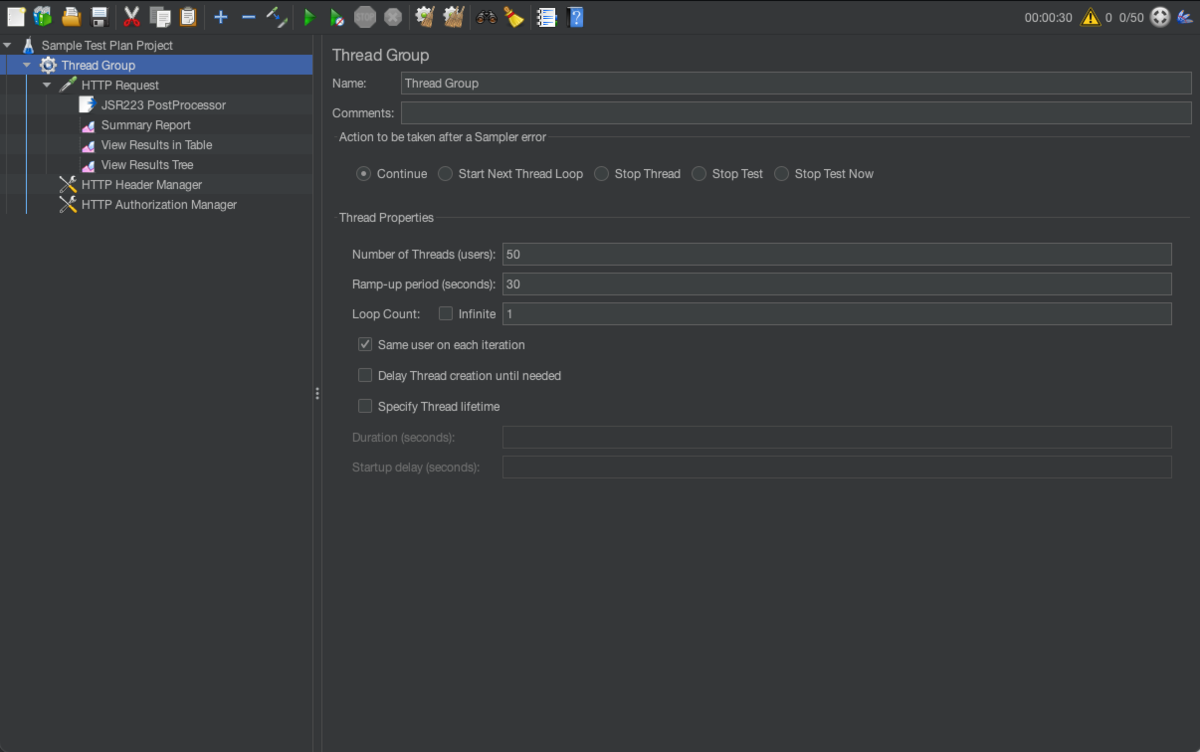
Thread Group: It is a core component where we set the number of users and the time period of request execution.
HTTP Request: It is an API component where we set a sampler to send a request to a web server. We can apply various methods for this request, such as GET, POST, PUT, DELETE, etc.
Summary Report: It is a listener component where it computes the overall result of each request from the HTTP request.
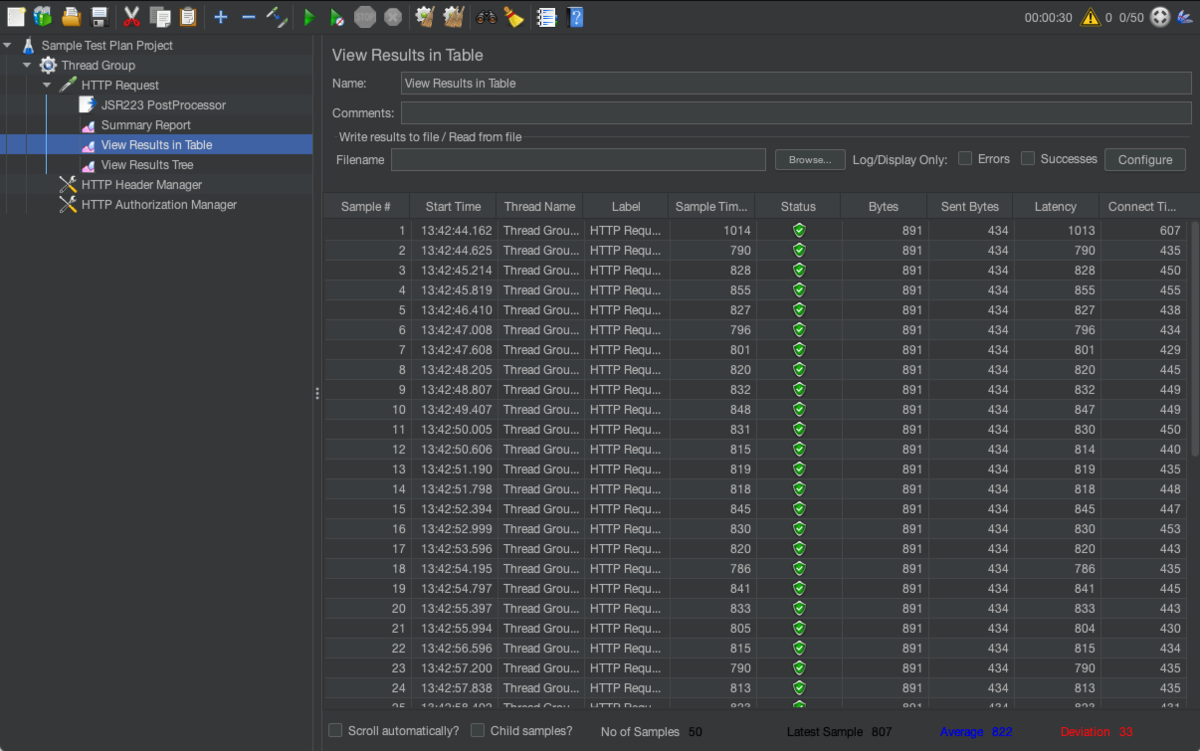
View Results in Table: It is a listener component where it logs all the responses from each request with the results data, such as start time, sample time, status, latency, connect time, etc. Which is helpful to identify certain request that has minimum and maximum latency from their response
View Results Tree: It is a listener component where it logs the detailed of each request and response from users. This is also helpful to identify the errors from this logs to quickly investigate the problem.
HTTP Header Manager: It is an API component where we apply some additional required header from specific HTTP Request. Since some of the APIs have strict requirements before we gain access to the services.
HTTP Authorization Manager: It is an API component where we apply authentication credentials before we can access the services. Some of the services requires authentication for security purposes
After setting up the API request method, the concurrent users, and other required features, you can now click the green play button to start the process. After the execution, you can now verify the response latency based on the result of each request. We can also check the other listener component to check the request/response logs and average latency.
Test Plan for Performance Testing
For the test plan of performance testing, we can identify each function that uses API in order to determine which of them are needed to check the performance. We determine the performance of the services depending on the demand of features that need to be checked. In my perspective, it's ideal to check the performance of the specific features that may cause certain issues:
- High Volume Operations (e.g. bulk update)
- External Integration (e.g. sending emails to multiple users simultaneously)
- High Queries (e.g. filtering 5,000 employee data)
- System Endurance (e.g. executing 500 requests continuously for 8 hours)
Here is a template example for performance test plan:
Feature: Name of the feature to check.
Thread Users: Setting up the number of requests in the feature.
Ramp-up Period: Setting up the time period of the execution.
Ideal Response Time: We set the ideal response time that system should behave.
Test Attempts: A record where we set the average time of each attempts. Ideally, we check the behavior of the features three times to get the average response of the features.
Average Load Time: A record where we place the total average load time of three load attempts. (e.g. (sum of attempts) / no. of attempts)
Status: This is where we set the remarks of the test results if it meets the ideal response time from based on the average result.
Error Remarks: This is where we set the error remarks after the load execution.
Comments/Remarks: A remark for the test results.
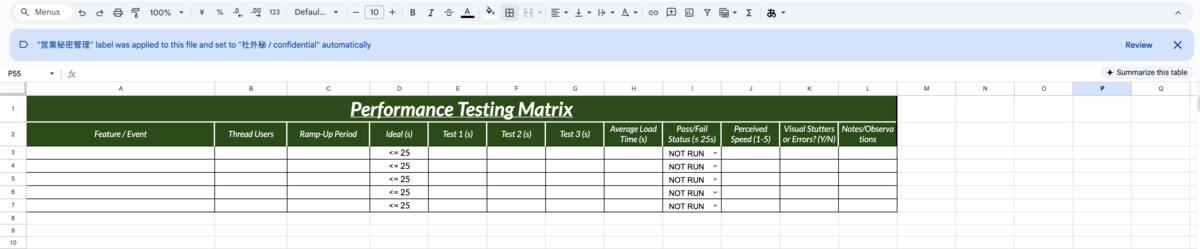
With this template, we can track the performance for each features that has been implemented in the product. It is also feasible to check the existing functionalities to verify the performance stability after applying the features, which is also part of regression testing.
Additionally, when testing it for environment servers, it is ideal to test it for servers that are almost accurate to the speed of production environment (e.g. integration or staging environment) to easily investigate the potential issue and behavior of the product.
Conclusion
In conclusion, knowledge of performance testing is essential to the QA processes, as we are responsible for ensuring the stability and reliability of a system's performance. As QAs, we don't just find and catch bugs and raise tickets, we also prioritize and ensure customer/user satisfaction by giving them a product quality without them experiencing slow interactions or failures with the services.
This article aimed to highlight the critical importance of performance testing in modern software quality. With the foundational information, We hope you gain further insights and are encouraged to explore the intermediate or advance methods in performance testing. Thank you for reading!
For tomorrow, the article 「SEQからEng異動した話」 written by yellow, エンジニア, will be published.
Let's keep good quality~~
