
Hello! I'm Dar, a QA Engineer on the Hyouka feature team in freee人事労務 (HR) from Likha.
This is the 20th day of freee QA Advent Calendar 2025.
I'd like to share with you my journey of rediscovering exploratory testing.
What I thought was exploratory testing
During my first few months of being a QA Engineer, I would be asked to do exploratory testing and I would usually find myself in either of these two scenarios: 1) spend the time going through different components and checking the flow of certain screens or pages; or 2) spend a bit of time testing a page and then get stuck and not know what else I should do. Sure, I’d see some inconvenient flows and log some defects but I never found it fruitful because I keep on jumping on whatever I feel like testing and there’s no direction on the way I’m testing.
Initially, the way I viewed exploratory testing was just an aimless way of testing that allows me to test however I want without being confined by the boundaries of written test cases. In a way, this is correct because exploratory testing gives the tester more freedom in testing rather than sticking to what the test cases say. However, “aimless” is not an adjective we use for exploratory testing.
What exploratory testing actually means
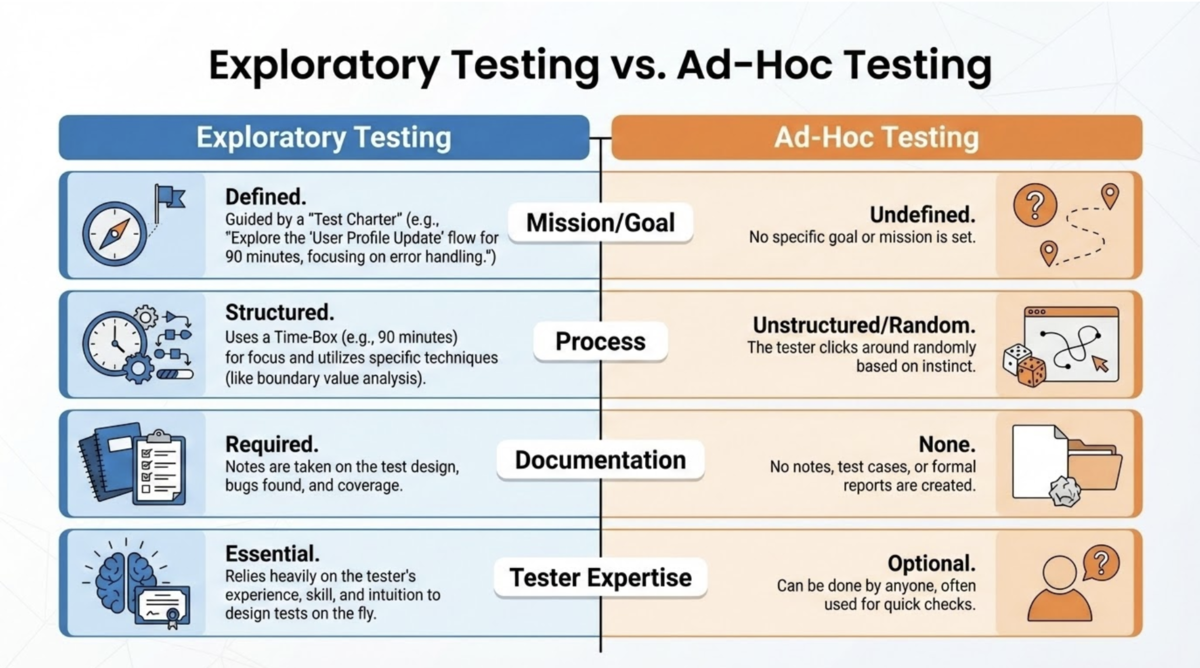
As mentioned in the ISTQB syllabus*, exploratory testing starts with a test charter containing a test objective. Test objective refers to the purpose or what you want to achieve with testing. This serves as the compass so that the tester will be focused on testing a specific test object or a certain aspect of the project which enables the tester to dig deeper.
An example of test objective is defect finding (we usually call bug hunting) where destructive tests will be performed, which is a common usage of exploratory testing especially for fast-paced projects with tight deadlines.
Test objectives for exploratory testing do not always have to be about finding defects. Another important aspect of exploratory testing is learning and discovery which means that the tester learns what the product is about at the same time of the test execution. This is why it is called “exploratory”.
Testing without a test objective is another type of testing called ad-hoc testing.
Another thing about exploratory testing is that it is usually time-boxed (session-based testing). Setting a specific time on how long a tester will conduct the testing ensures that the effort is easily measured and allows the tester to focus on a specific objective for a given amount of time.
How do I apply it now
Projects in my team are usually big and are composed of multiple pages. Conducting exploratory testing in a multi-page project as a whole will take more time and might not be as effective as isolating the scope of the test to a specific part of the project.
Here is how I apply exploratory testing more effectively in my projects:
1. Divide and conquer
For a multi-page project, I make a test charter or an outline per page to determine what are the components scoped in that page. I try to review documents or mockups when doing this so that I’ll know what’s missing.
In the absence of any test basis, you may still create a test charter based on what is already deployed, industry standards, user stories, or even from past experience of using something similar.
If a project is only contained in one page, then I can further divide it into specific sections of the page. This may also be done for test charters of a multi-page project especially if some sections of the page are more important or complex than others and requires more focus and time on its own.
This process determines my test object.
2. Find the focus
I find it better to further categorize based on the aspect of the project that I’m going to test. Testing all aspects of a page during one exploratory phase may be overwhelming. This increases my focus when testing and attention to detail.
My exploratory phases can be:
- UI - focuses on all visual components. I check the text and component types – font size, color, correctness, appropriateness, and if it’s aligned with other existing components of the same nature. For tables and the column widths — some tables are made to not occupy the whole screen because the Product Team wants the users to focus only on a small part of the screen and not require a lot of eye movement. Check if there’s any excess or unnecessary white space.
- Functionality - focuses on whether components work as intended. I check whether changes in component states are working or if clicking components result in an appropriate action.
- User Flow - focuses on whether user interaction with the system feels natural or not. In successive actions on the page, is there anything that feels too repetitive or not intuitive? I also take note if something feels or responds slowly. I may check browser back button behaviors and direct access to URLs.
- Destructive scenarios or error states - focuses on breaking whatever is the test object. Some scenarios I like to test are making the forms fail on submit, two-tab scenarios to simulate two people modifying the test object, accessing deleted items.
I do not require myself to go through all these phases for every project. I base the focus on the nature of the project.
This process determines my test objectives.
3. Set the time (optional)
The time allotted for an exploratory testing highly depends on the scope and focus of what will be tested. Testing the UI usually does not take as much time as testing the functionality or the error states. And if the test object is too complex or has many functionalities and combinations, then it is safe to set more time for exploratory testing.
Do note that the time allotted relative to execution is flexible. You do not need to consume the full time if it is not needed and you may choose to extend. You may also set another session as necessary.
4. Time for execution
The tester now has the freedom to go through the test object with the test objective in mind. Any unintended behaviors or unusual failures found during testing will be logged (be sure to note them down) and dealt with after the test execution.
5. Review and report
The list of unusual behaviors or failures observed during exploratory testing will now be reviewed. I will try to replicate them and check whether they meet the specifications or not. Confirmed failures will be raised to the developers and tickets will be created, while behaviors that fall into a “gray area” or are not clearly specified in the requirements will be discussed with the Product team.
Conclusion
Aimless testing is not exploratory testing. Having a clear objective grounds the tester and makes the testing more effective and productive. An exploration without a mission can immediately get anyone lost.
The article 簡単なところから始めてみるAI活用 written by kacy-san , QA engineer of 基盤開発 will be published tomorrow so stay tuned.
Let’s keep good quality~
References:
*Cerquozzi, R., Decoutere, W., Riverin, J.-F., Hryszko, A., Klonk, M., Riou du Cosquer, E., Posthuma, M., Roman, A., Stapp, L., Ulrich, S., & Zakaria, E. (2024). Certified Tester Foundation Level Syllabus v4.0.1 (p. 44). International Software Testing Qualifications Board. https://istqb.org/wp-content/uploads/2024/11/ISTQB_CTFL_Syllabus_v4.0.1.pdf
